Introducing our latest enhancement on the point of sale module, which will improve your system experience and usability.
Ability to Filter and Group-by Customers
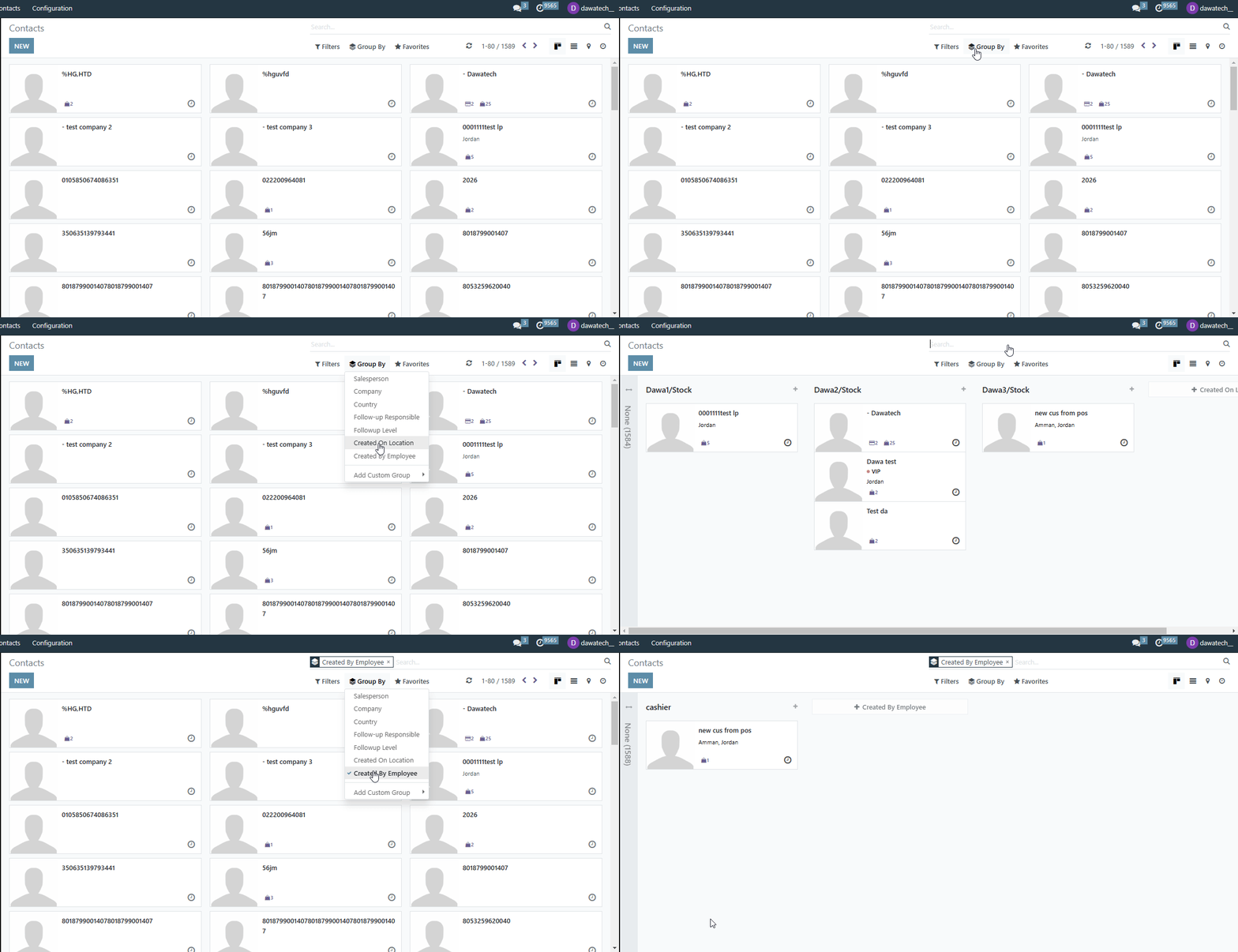
We’re excited to introduce the new Filter and Group-by enhancement in the Contacts Module for your POS!

Functionality:
You can now manage customer records more efficiently with two new options: Group By and Filter By. The Created On Location option allows you to view customers based on the POS location where they were created, while the Created By Employee option helps you identify which employee (cashier) created the customer from the POS.

Value:
This enhancement provides improved customer insights, making it easier to track customer creation trends, analyze employee activity, and optimize customer management.
Enhance your POS experience with better filtering and grouping options in the Contacts Module today!
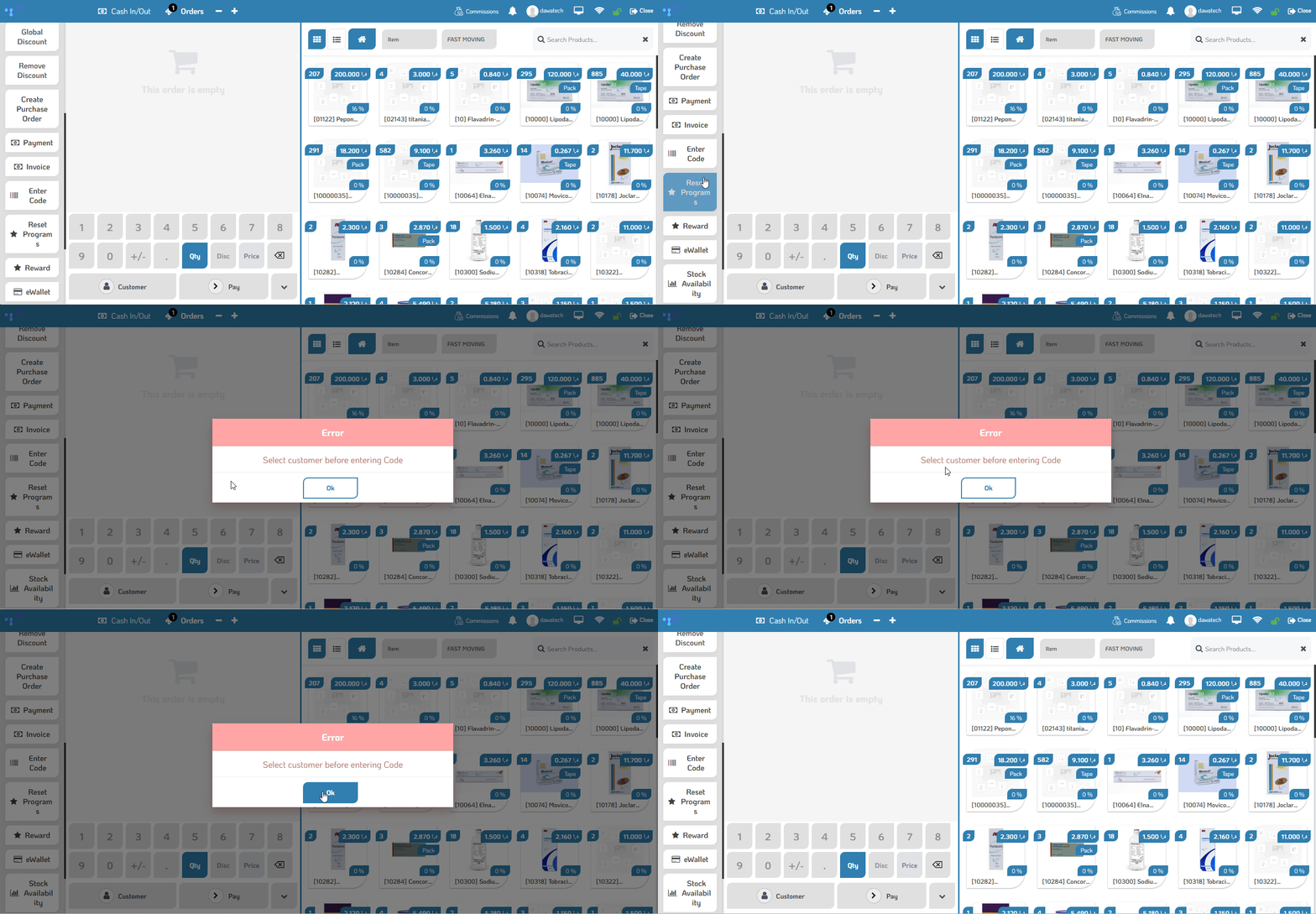
Mandatory Customer Selection When Using ENTER CODE
We’re excited to introduce a new POS setting to enhance transaction accuracy and control!
Functionality:
A new option is now available in POS settings that prevents entering a code unless a customer is selected first. This ensures that every transaction is properly linked to a customer, reducing errors and improving tracking.
Value:
This enhancement helps maintain data accuracy, ensures customer-related transactions are recorded correctly, and minimizes potential mistakes in sales processing.
Upgrade your POS experience with better control and accuracy today!
Set Loyalty Points to Zero
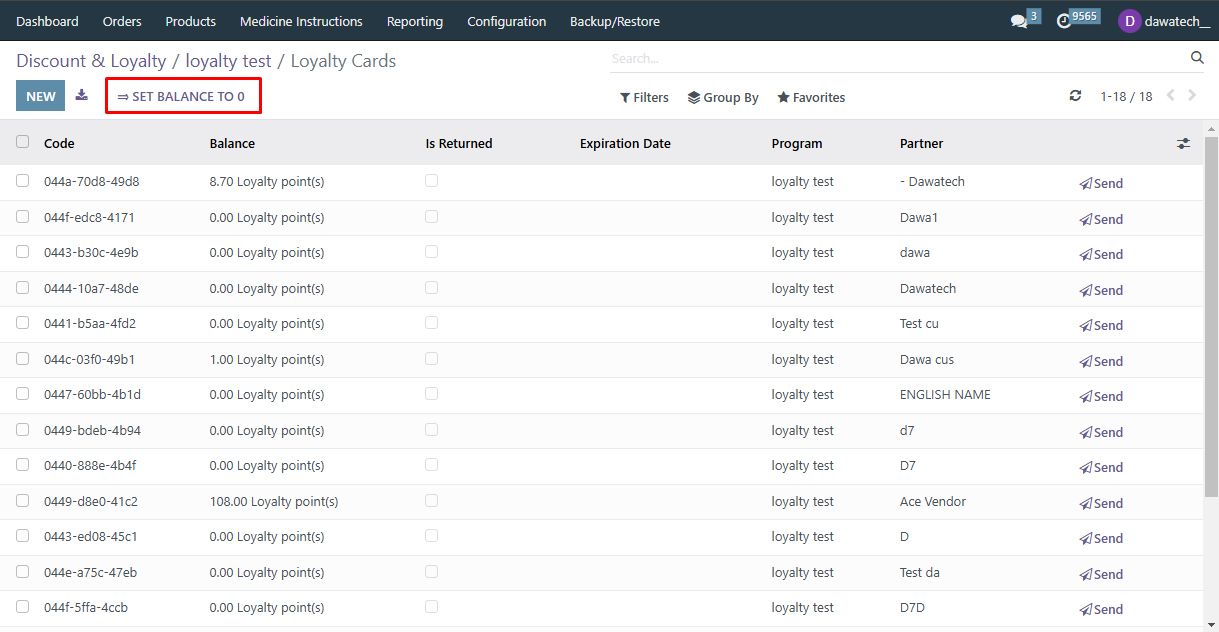
We’re excited to introduce a new permission setting for the Loyalty Points enhancement in your POS!
Functionality:
With this new permission, users can now reset all customer loyalty points to zero at once when needed. This provides greater flexibility in managing loyalty programs and maintaining accurate point balances.
Value:
This enhancement streamlines loyalty point management, allowing businesses to reset points efficiently when required, ensuring a fresh start for promotions or program updates.
Take full control of your loyalty program with this new enhancement in your POS!
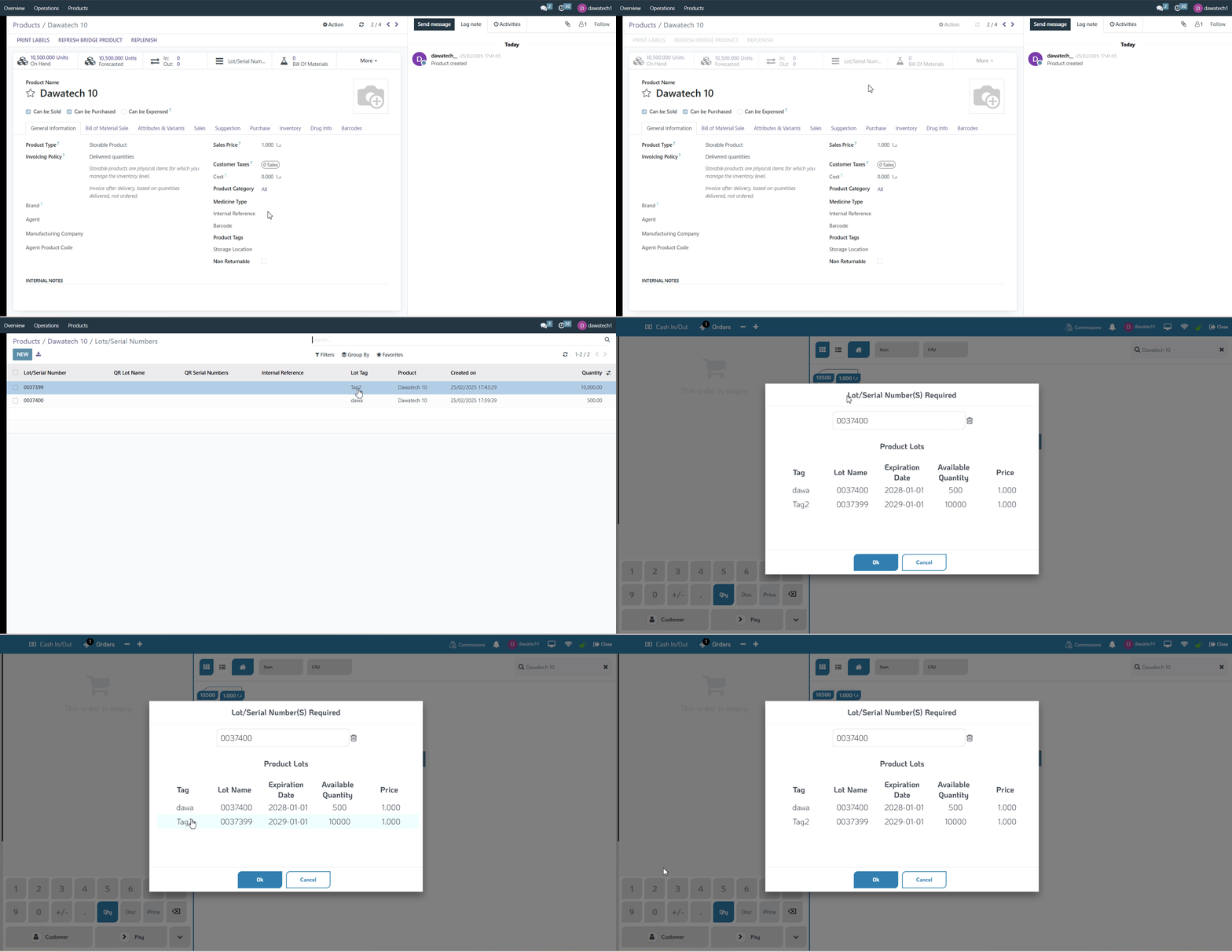
Apply Tag on Batch Number
Tracking your product LOTs just got easier and more organized!

Functionality:
We added a new way to track product LOTs. LOT tags will now appear in the lot selection popup during the POS session, making it easier to choose the correct batch.

Value:
This enhancement gives you better control over LOT tracking. With LOT tags visible in the POS session, you can quickly identify and select the right batch, reducing errors and speeding up sales. Managing product lots is now more efficient and intuitive, helping you keep your inventory organized with ease.
Ensure you have the necessary access and permissions to use this feature. (Contact Dawatech Support for assistance.)Enjoy smoother lot management in your POS!
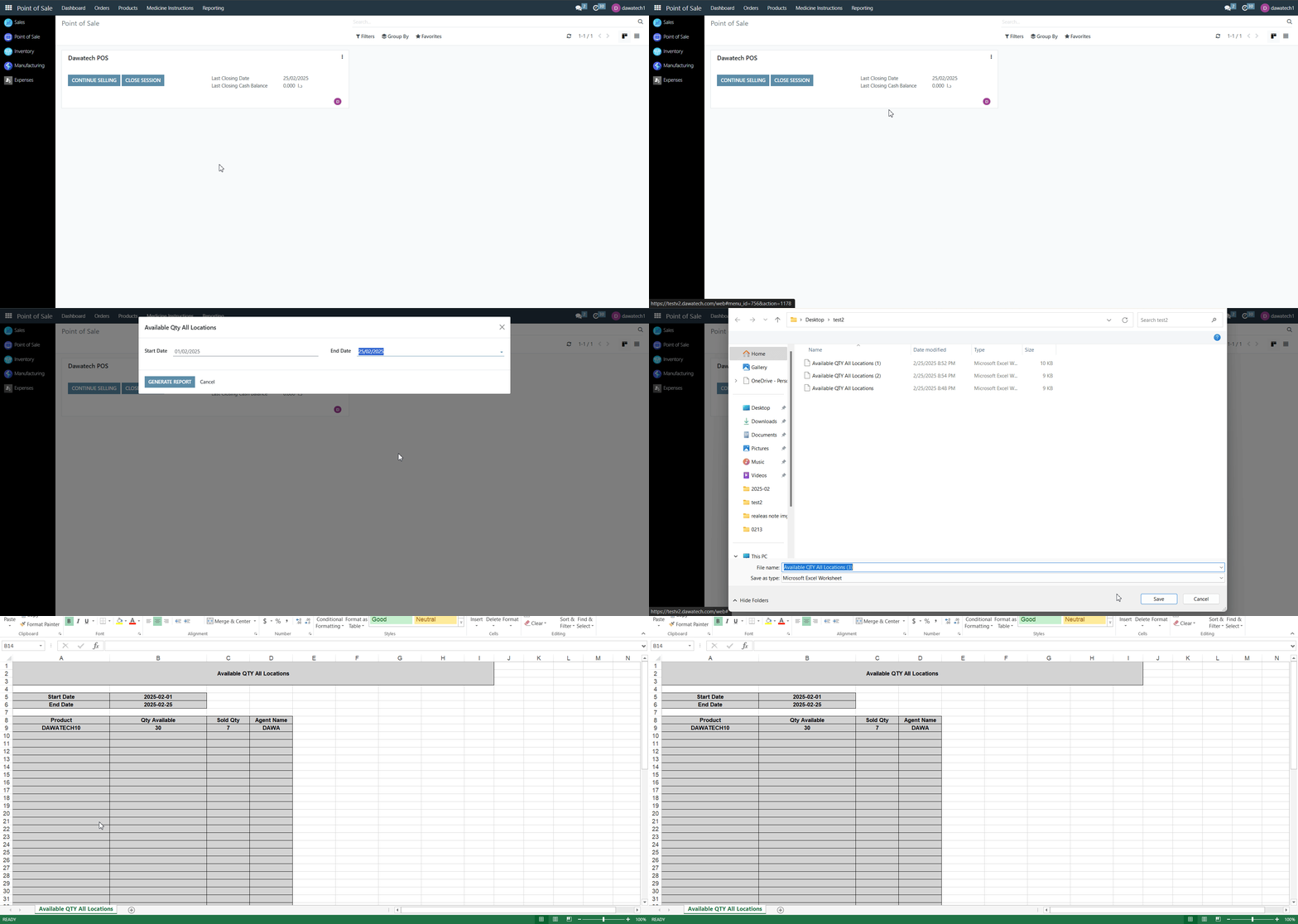
Available Qty All Location New Report
Get ready to track your inventory with more visibility and control across all locations!

Functionality:
A new report has been added to show the available quantity across all locations. You can now easily check product availability directly from the POS reports.

Value:
This enhancement gives you a clear view of product availability in all locations, helping you make better restocking and sales decisions. With quick access to real-time data, managing inventory becomes smoother and more efficient.
Ensure you have the necessary access and permissions to use this feature. (Contact Dawatech Support for assistance.)Enjoy the enhanced visibility happy managing!
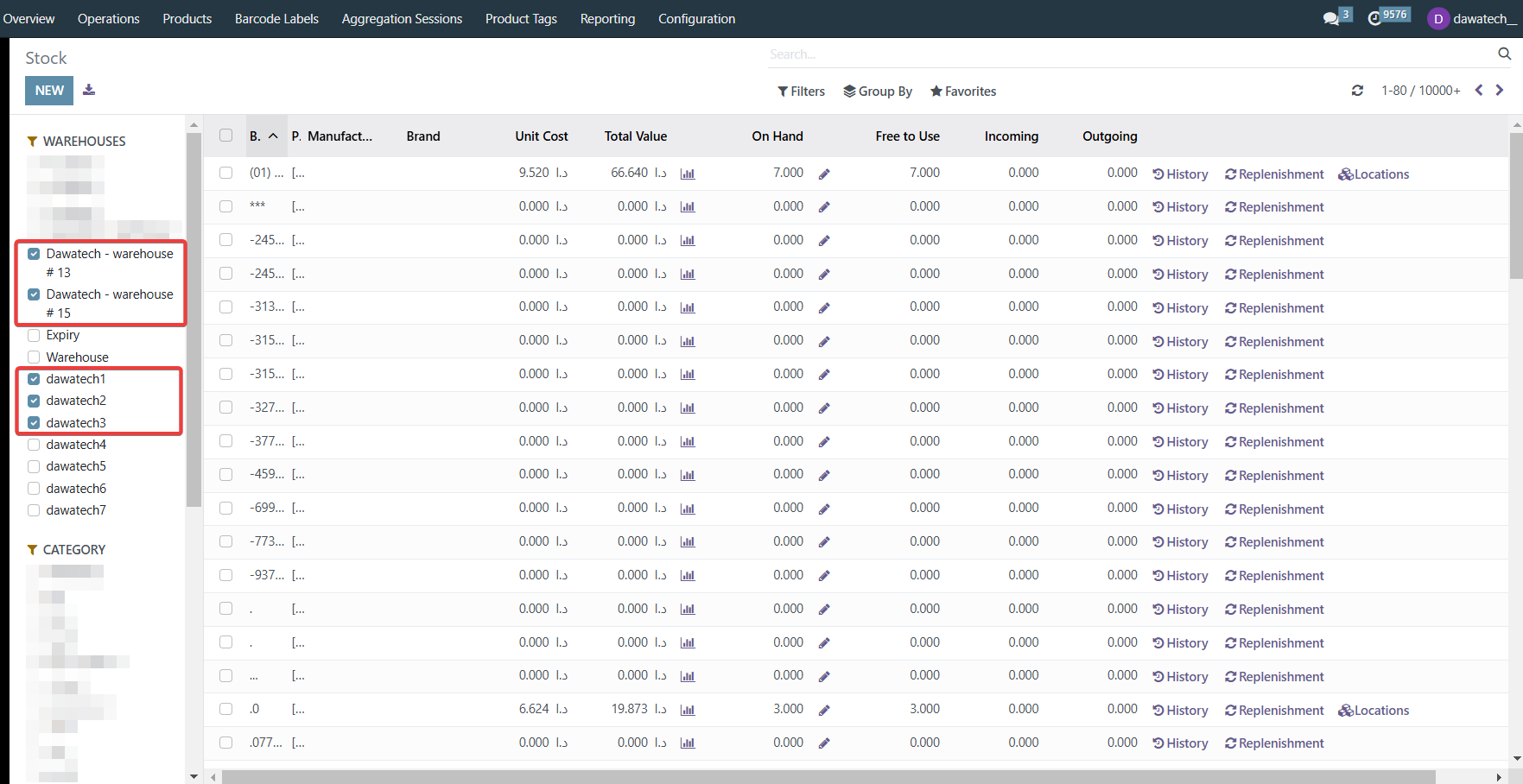
Add the Ability to Select Multiple Warehouses in the Stock Report
Managing stock across different warehouses just got easier with our latest enhancement!

Functionality:
We added a new enhancement to the stock report, allowing users to select multiple warehouses and filter the data based on their selection.

Value:
This enhancement helps you get a clearer view of your inventory. You can easily track stock levels across multiple warehouses in one report, reducing the need for manual checks and speeding up decision-making. It gives you better visibility and control over your inventory, all in one place.
Enjoy the enhanced stock reporting experience!
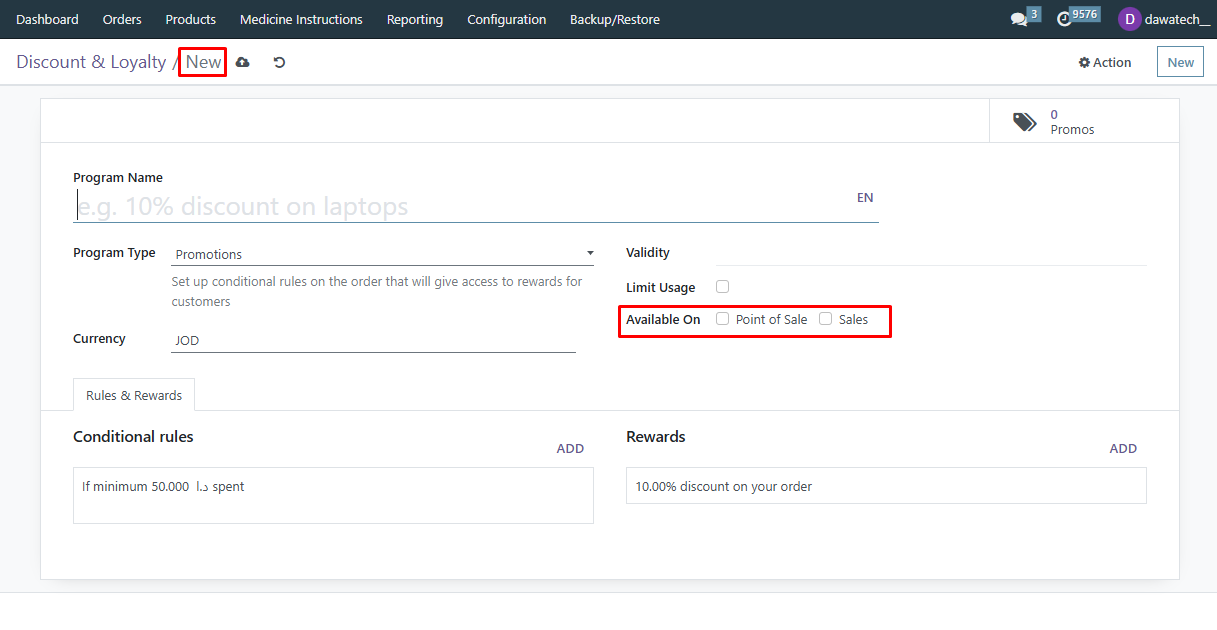
Creating Promotions Enhancement
We’re excited to introduce a new enhancement that enhances control and accuracy when setting up promotion programs in your Point-Of-Sale system!

Functionality:
With this enhancement, the Available On fields will now remain disabled by default when creating a new promotion program. This ensures that a promotion cannot be unintentionally activated before its setup is fully completed.

Value:
By preventing premature activation, this enhancement helps avoid accidental application of incomplete promotions, reducing the risk of incorrect discounts and ensuring a smoother sales process. It’s a simple yet effective way to enhance accuracy and prevent order discrepancies.
Ensure you have the necessary access and permissions to use this feature. (Contact Dawatech Support for assistance.)Try out this enhancement today and set up your promotions with greater confidence!
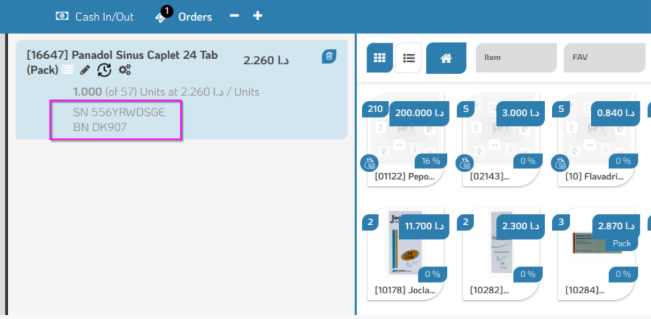
Show Serial Number of Product at POS and Change SN to BN
We’re excited to introduce a new enhancement to the POS cart, making it easier to track product details during sales!
Functionality:
Now, when scanning a product QR code, the Batch Number (BN) and Serial Number (SN) will automatically appear in the POS cart. This update ensures that both batch-tracked and serial-tracked products are clearly displayed at the point of sale. Additionally, we’ve updated system references to use BN instead of SN where applicable, improving consistency in product tracking.
Value:
This enhancement simplifies inventory management by providing real-time visibility of batch and serial numbers in the POS cart. Cashiers can now verify product details instantly, reducing errors and ensuring accurate tracking for stock control and after-sales support.
Upgrade your POS experience today with better product traceability and a more intuitive interface!
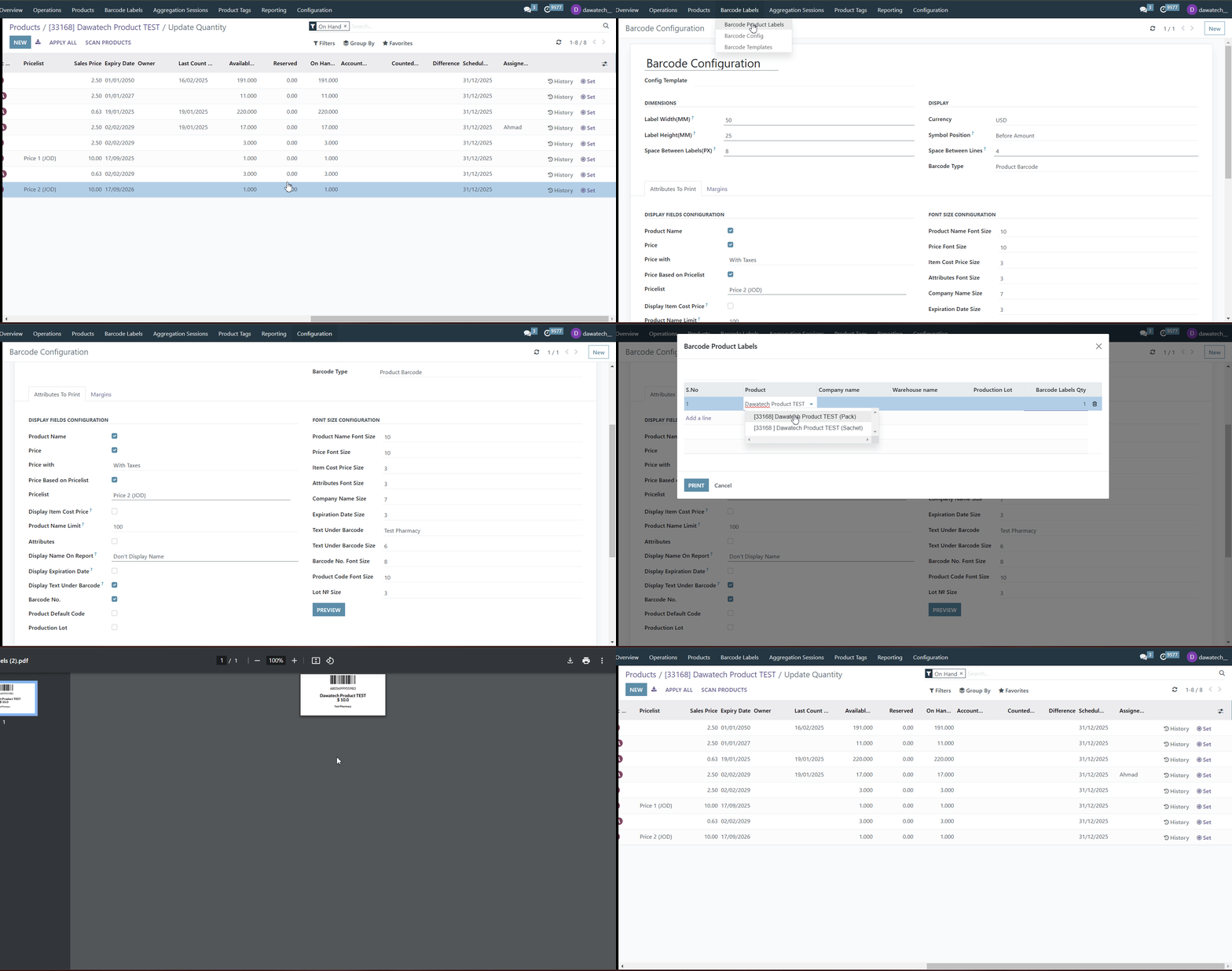
Print Barcode for Pharmacy According to Price List (V1)
We’re excited to introduce a new enhancement to the barcode printing feature in your POS!
Functionality:
Now, you can configure and select a price list for barcode printing. This means that when generating barcode labels, the system will automatically print the corresponding prices from the selected price list.
Value:
This enhancement ensures accurate pricing on barcode labels, reducing manual price adjustments and improving efficiency for pharmacy operations. It helps maintain consistency across products while saving time on labeling.
Upgrade your barcode printing experience with price list integration today!
Add Vendor at Profit Per Item Enhancement
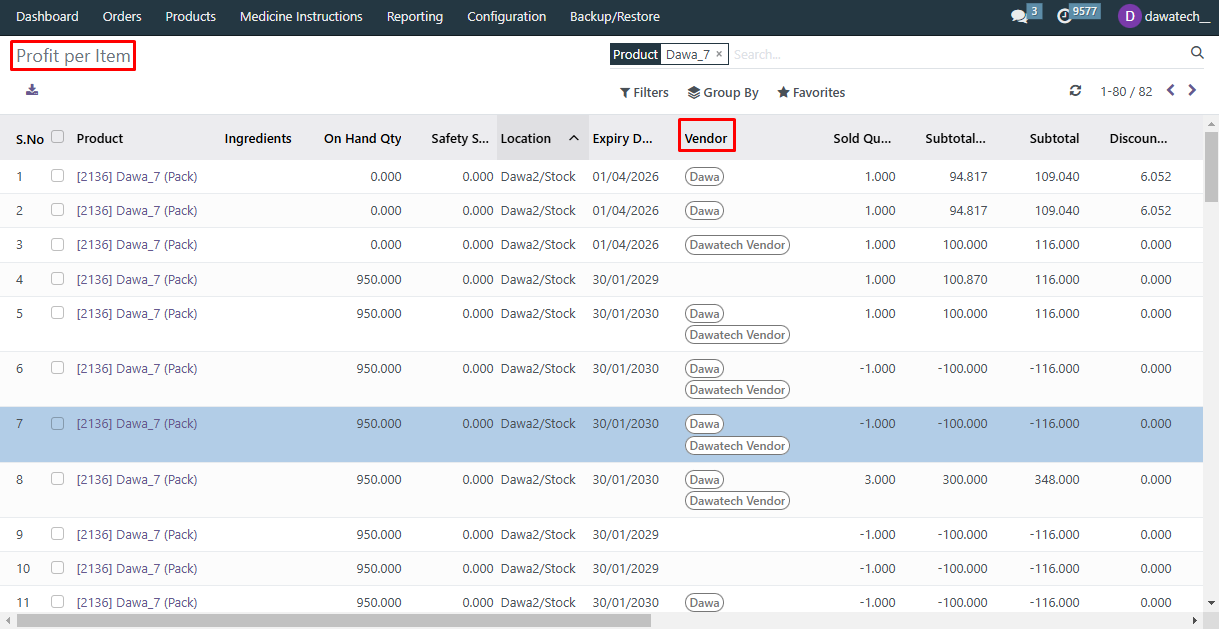
We’re excited to introduce the Add Vendor at Profit Per Item Enhancement to improve visibility and accuracy in your reporting!
Functionality:
Now, the Vendor column in the Profit Per Item report will display each lot's specific vendor when buying from one, instead of listing all vendors for a single product in the same column. This enhancement ensures clearer tracking of product sourcing and profitability per vendor.
Value:
This enhancement aims to better clarity on vendor-specific profitability, allowing for more precise financial analysis and reporting. This will enhance the accuracy of financial insights, enabling informed decision-making. Additionally, it will reduce confusion when managing multi-vendor purchases, streamlining processes and improving overall efficiency in vendor management.
Enhance your reporting experience with the improved vendor tracking in the Profit Per Item report!
Home Delivery Enhancement
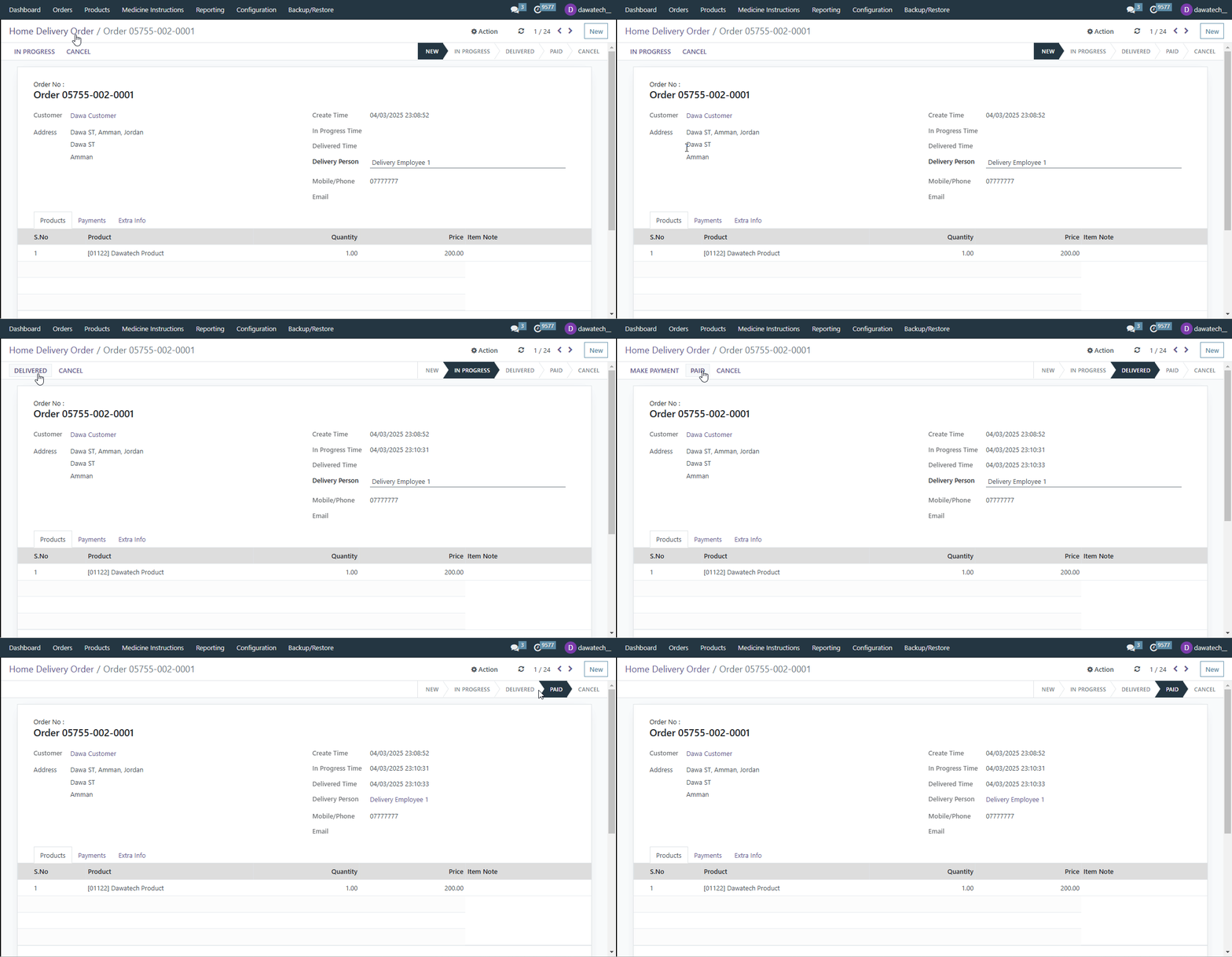
We’re excited to introduce the Home Delivery Enhancement to streamline your order management and improve visibility!
Functionality:
Now, the Home Delivery Orders page will display the customer address for each order, providing better clarity on delivery details. Additionally, the Pay button now includes a new permission enhancement that allows it to be shown only to specific users, offering greater control over payment access.
Value:
The improvements aim to increase the visibility of customer delivery information, providing a clearer overview of order statuses. Additionally, control will be enhanced by restricting access to the Pay button, ensuring only authorized users can complete payments. These changes will also contribute to better order management efficiency and security, optimizing both operational processes and safeguarding sensitive information.
Streamline your home delivery process and manage access more efficiently with the new Home Delivery Enhancement!
Excluded Loyalty Points When Using Enter Code Discounts
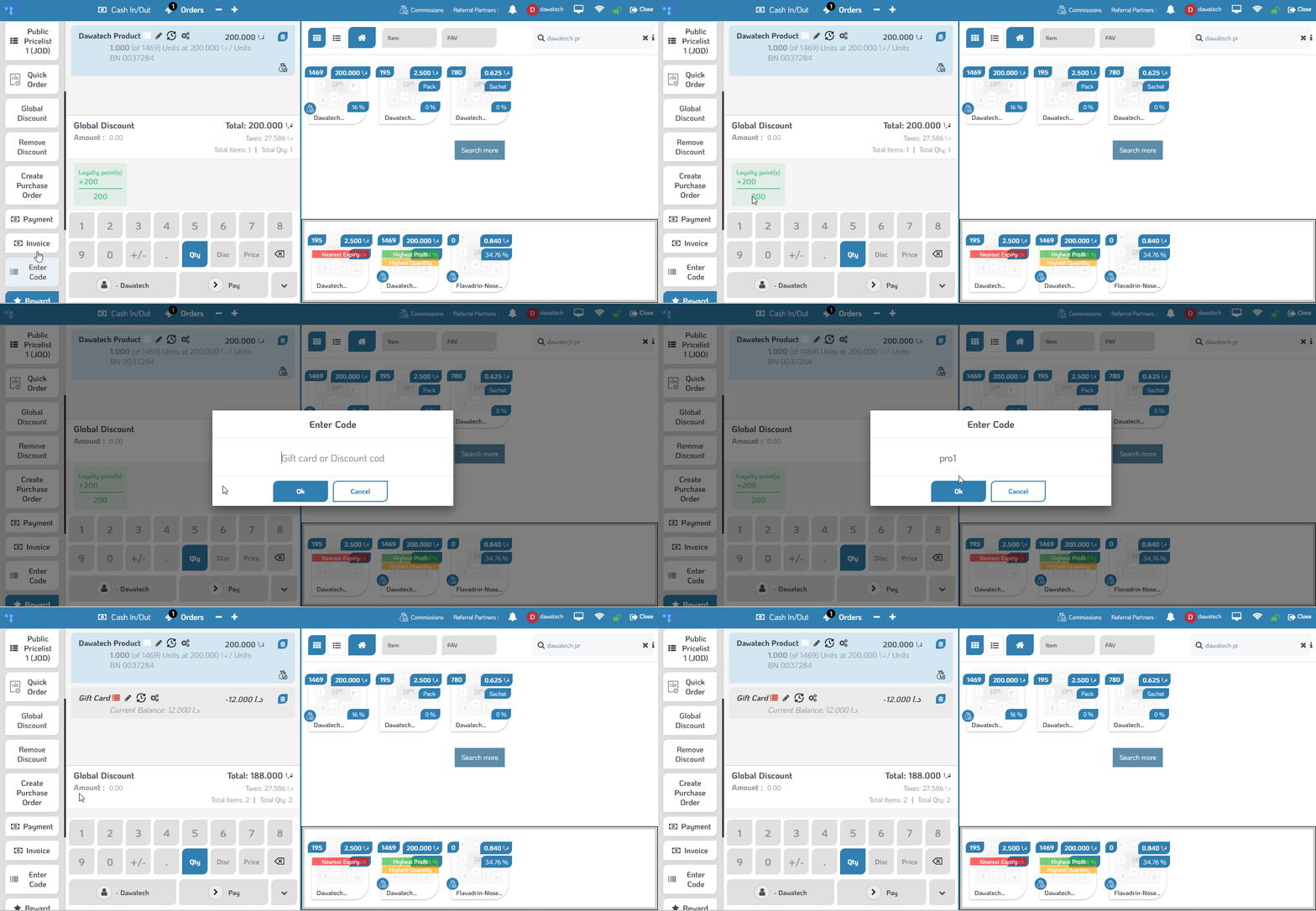
We’re excited to introduce a new enhancement for your POS!
Functionality:
Now, you have the option to exclude loyalty points when applying discounts using an enter code. This ensures that loyalty rewards are not accumulated when customers use discount codes, providing better control over your loyalty program.
Value:
This enhancement helps maintain a fair rewards system by preventing double benefits and ensuring that loyalty points are awarded only for eligible transactions. It also provides greater flexibility in managing promotions while maintaining business profitability.
Optimize your discount strategy with the new Excluded Loyalty Points enhancement in your POS!
Was this article helpful?
That’s Great!
Thank you for your feedback
Sorry! We couldn't be helpful
Thank you for your feedback
Feedback sent
We appreciate your effort and will try to fix the article